
The Microsoft Evaluation Center brings you full-featured Microsoft product evaluation software available for download or trial on Microsoft Azure. Now we hack Admin Password To verify the user name, by simply typing net user, I get a list of all the user names on that windows machine. Now, go to the command prompt and enter: cd cd windows system32 net user If there are people near you and you don’t want them to see the password you type, enter: net user.
Last updated on March 29th, 2020 at 04:40 pm
Recently, I opened up my Windows PC after one and half year and it was really unexpected to see the error – Wrong Password. This is something which I use for daily two years before.
Hackers Take the Payload in USB Drive and Just Insert the USB into Targeted Windows Computer. If you need Admin password and you forget it just go to the “USBCracker” folder and open the “Admin Cracker.exe”. You will be prompt with a “cmd.exe” in Administrator Mode and then type the following:-(Your Drive Letter): -cd USBCracker. Reset Windows Password (zipped ISO image) Reset Windows Password was developed for resetting, changing and recovering Windows logon passwords and unlocking user account. For example, when the Administrator’s password is lost or forgotten.
This might be the reason for you or something different. No matters what the thing is – we have to get back the administrator password back. Right?
There are some of the proven ways which we have used to recover password and still works best for us. Our suggestion is to go with freeway firstly, it that doesn’t work, definitely using the third-party tool (skip to the third method) is the only option.
Are you sure, you require Admin Password to Log in?
Log in to your PC can be in two different ways, either by admin account or other users account. Recovering users account password is generally easy and you can recover that account password using cmd commands.
To access your PC at an administrator level, the password that admin has set is Windows administrator password. Download medal of honor pc. In Windows 7, Windows 8 and Windows 10 almost every account is connected to an administrator password.
How to Find Administrator Password Windows 10
There are three ways to reset your Windows administrator password
- PC linked to Microsoft account
- Using command prompt (preferred for users account)
- PC does not link to any Microsoft account (Using utility software PCUnlocker)
Method 1: When linked to Microsoft account
For this, you need to access the internet on other PC to reset your account password.
STEP 1: When you enter your password and it shows that you have entered an incorrect password then below this you will see a website link to reset your password.
Agriculture ebooksbharsar students jobs. STEP 2: Now choose I forgot my password and tap Enter.
STEP 3: Enter your Email address/ Phone number/Skype ID and character you see after this tap Enter.
STEP 4: Now verify your identity by selecting appropriate option suited you best.
STEP 5: Now once you select the above option the confirmation code will be sent and you have to confirm your identity.
STEP 6: Enter your new password and confirm it again.
Once you completed all the above steps you can go back to your PC and enter the new password you have set. By this, you can easily access your PC.
Method 2: Reset Windows 10 Administrator password using command prompt
To use command prompt on your same PC you need to have access to another account on your PC. If you don’t have then you have to see below methods. Using cmd to reset Windows 10 admin password is just a simple task. Only you need to follow some simple steps.
STEP 1: Open cmd and run it as an administrator.

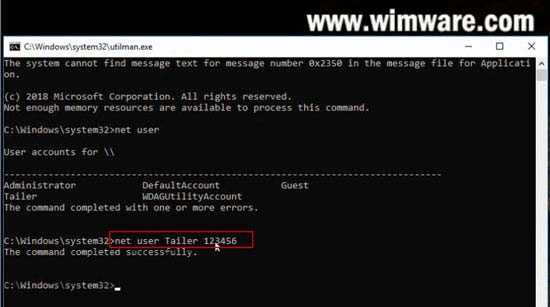
STEP 2: Here you have to enter net user and then press enter key. Here you will see all the user accounts linked to your PC.
STEP 3: Type net user <user name> <new password> and press Enter key.
NOTE: Here you need to replace <user name> with your name displayed on user account list and <new password> with the password you wish to reset. See screenshot to make this more clear.
Method 3: How to Reset Windows 10 Password with PCUnlocker
Before using this method you must have spare PC, follow some simple steps to unlock your PC
Step 1: Download and unzip PCUnlocker File
- Here you need to access any other computer to perform some of the functions. You have to download PCUnlocker on another computer.
- Once you have downloaded PCUnlocker, right-click on the downloaded file and select Extract All option.
- Here you will get the PCUnlocker.iso file, tap on Extract option.
- Now you have to burn this PCUnlocker.iso file on your USB drive.
Step 2: Make a bootable USB using ISO2Disc utility
- For this, you have to download a free tool ISO2Disc. Once download completed open that file.
- Install it by following some simple steps. Click Finish once installation completed.
- Now you have to insert the flash drive into your computer.
- Launch ISO2Disc and tap on Browse button. Here you need to locate PCUnlocker.iso file and open it.
- Now again on ISO2Disc, choose option Burn to USB Flash Drive. Click Start Burn.
- Confirm it again by clicking Yes. Make sure you have a backup of the data you have on USB.
- Wait for a moment, and you will see Burn Finish successfully.
Step 3: Boot your PC with PCUnlocker USB Drive
- Insert USB drive to password-protected PC. Go to reboot option. Now enter into BIOS settings (in my PC BIOS settings display by F2 command) Different system has different keys. Go to boot option and select your USB drive.
- Save the settings by pressing the F10 key and Enter.
- Now your locked PC will boot from password reset utility boot drive.

Step 4: Reset your PC password

- Once your PC boots USB drive finishes, the PCUnlocker launch automatically.
- Here you will see
- Select a recovery mode: choose a Local Admin/User password.
- SAM registry file: By default, it is selected.
- User account: Choose Administrator.
- Once selected above option, tap on Reset Password option (see screenshot).
- Confirm it by clicking on Yes button.
Once you have successfully reset the password of your account, click OK and tap Restart button.
Now your computer will restart automatically without showing password page.
Conclusion
These are the best ways to get your admin password. If you are already signed in with your Microsoft account, it becomes easy to find or reset the password from there, for users login password, you can try command prompt from the admin account.
If none of the steps works then definitely third-party software is the best solution and almost all readers are completely satisfied.
After knowing your password of Windows PC, we recommend you to backup all your important data so that you don’t lose anything important.
Further, there might be a case when PC is not performing well, we recommend you to use CleanMyPC software to clean all junk files, temporary files and speed up PC.
You may also like:
Hope this tutorial works out for you to its best and you will easily find windows 10 administrator password. You can follow us on Facebook, Twitter.
Now that Windows 10 20H2 is released, otherwise known as the October 2020 Update, Microsoft has made new ISO disk images for the operating system available.
– Epson SP-1390 Adjustment Program enables to perform maintenance and adjustment functions such as: Reset Waste Ink Pad. Wednesday, 20 January 2021 Request Lifetime Reset Key. Reset Epson SP 1390 Download Adjustment program VIP Printer Service. Reset Epson TX115, Reset Epson T50, Reset Epson T25, Reset Epson T40W, Reset Epson TX120, Reset Epson TX125, Reset Epson TX220, Reset Epson TX228, Reset Epson TX420. Epson XP 211/214/411 AdjProg Definition – Epson XP 211/214/411 AdjProg or Epson XP 211/214/411 Adjustment Program or Epson XP 211/214/411 Adj Program, is a middleware developed by third-party software to supply for Epson XP 211/214/411 printer, making printer continuous printing. Recomended Files. Reset epson adjprog L380 -funciona - Work fine 2019.rar; Adjprog reset L3100 L3110 L3150 L3151.zip; AdjProg cracked.exe; reset epson adjprog XP111-XP211-XP214-XP311-XP411.rar. Adjprog epson 1390 date.
If you want to perform a clean install of the operating system on a new machine or run into a problem, it is helpful to have a copy of the latest Windows 10 media. In this article we will explain how to download the Windows 10 20H2 ISO directly from Microsoft.
For those not familiar with an ISO image, they are a sector-by-sector copy of a DVD. This ISO file can then be written, or burned, to another DVD to create a replica of the original media, mounted as a drive letter in Windows, or extracted by a program like 7-Zip to access the contained files.
Below we provide a trick that causes Microsoft's site to offer a Windows 10 20H2 ISO rather than the Media Creation Tool.
How to download a Windows 10 20H2 ISO from Microsoft
When you go to Microsoft's 'Download Windows 10' page, you are given the option to update via Windows Update or to download the Windows 10 Media Creation Tool.
Below, we will provide a method that causes Microsoft to offer an ISO image file for Windows 10 20H2 instead.
To download the Windows 10 20H2 ISO, follow these steps:
- Go to Windows 10 download page in Chrome or the new Microsoft Edge.
- Click on the Chrome menu, then More Tools, and then select Developer tools, as shown below.
- Now press Ctrl + Shift + M to open the Device toolbar. This toolbar lets you force Chrome to impersonate another device such as a mobile phone or a tablet.
Click on the menu that should show Responsive and select iPad or iPad Pro so that you have a larger screen to work with. - When you select one of these devices, you should see the screen resize to reflect the size of the device's screen. At this point, I suggest you change the zoom to 100%, as shown below.
- Now refresh the page in the browser by pressing the F5 key. Once the page refreshes, Microsoft's site will now offer you the Windows 10 ISO instead of the Media Creation Tool.
Now click on the drop-down arrow under 'Select edition' and select the 'Windows 10' option under 'Windows 10 October 2020 Update'. Once selected, click on the Confirm button. - After a few seconds, Microsoft's site will now ask you to select the language for your ISO.Select your language and press the Confirm button again.
- Finally, you will be asked to either download the 32-bit or 64-bit ISO. When ready, click on one of these choices, and the respective Windows 20H2 ISO image will be downloaded.
It should be noted that the above instructions work in any Chromium-based browser, not only Chrome or the new Edge.
How to use the Windows 10 ISO
Now that you have downloaded the ISO, you can use it to upgrade your existing Windows 10 operating system, perform a clean install of Windows 10 20H2 to a new PC, or use it to access the recovery environment for troubleshooting.
For a clean install, you must have a Windows 10 product key available.
Before using the ISO, you will want to make sure you have a spare USB drive that you can use to create bootable Windows 10 USB media.
If you do not have a spare USB drive, you can purchase a 32GB Sandisk drive for about $8.99 or a 5-pack of 64GB USB drives for $30 on Amazon.
Windows Admin Hack Iso Win 7
You can then create a bootable USB drive from the ISO and use it to install the operating system.
Windows Admin Hack Iso Download
For example, if you can no longer boot your computer due to a virus or wish to enter the Windows 10 Recovery Environment to remove a stubborn infection, you can boot your computer using the Windows 10 installation media to repair the computer.
It is suggested that all users create new media from the Windows 10 ISOs as new feature updates are released.
Related Articles: